
Updated: September 25, 2026
Video has become an essential part of modern business communication. Companies use videos for marketing campaigns, product demonstrations, customer education, internal training, and social media engagement.
However, creating professional video content consistently can be challenging. Businesses often have limited time, small teams, and large amounts of footage that need to be transformed into engaging content.
This is where AI video editing tools are becoming increasingly useful. Instead of handling every editing step manually, businesses can use AI-powered platforms to speed up production while maintaining control over their content.
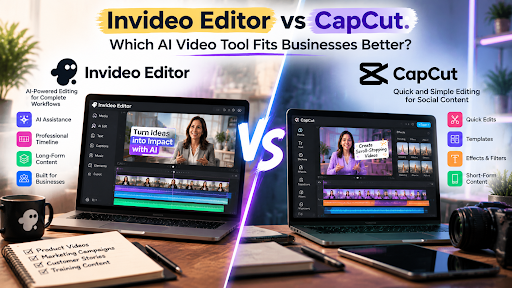
Two popular approaches in the AI video space are Invideo Editor and CapCut. While both tools help users create videos faster, they are designed for different types of workflows and business requirements.
What Is Invideo Editor?
Invideo Editor is an AI-powered video editing platform designed to help creators and businesses manage the entire editing process more efficiently.
Modern video production involves more than simply cutting clips together. Teams often need to review hours of footage, identify useful moments, remove unnecessary sections, improve audio, adjust visuals, and create different versions for different platforms.
Invideo Editor focuses on reducing this repetitive workload by combining AI assistance with a professional editing timeline.
Businesses can use AI capabilities to support tasks such as:
- Reviewing footage
- Selecting usable clips
- Creating initial edits
- Improving video structure
- Preparing content variations
The platform allows users to maintain control over their projects while using AI to simplify time-consuming parts of the editing process.
What Is CapCut?
CapCut is a popular video editing platform widely used for creating short-form content, social media videos, and quick edits.
It provides tools for:
- Video trimming
- Effects
- Templates
- Captions
- Filters
- Social media-focused editing
Many creators and businesses use CapCut because it offers an accessible way to create engaging content quickly.
For teams focused primarily on short-form videos and social content, CapCut can provide a simple editing experience without requiring advanced editing knowledge.
Invideo Editor vs CapCut: Key Differences
Choosing between these tools depends on what a business needs from its video workflow.
1. AI Assistance and Automation
The biggest difference between the two platforms is how AI supports the editing process.
Invideo Editor focuses on helping users manage more complex editing workflows by assisting with repetitive tasks involved in moving from raw footage to a structured project.
This can be useful for businesses working with:
- Customer interviews
- Webinars
- Product videos
- Long recordings
- Educational content
CapCut focuses more on quick content creation with AI-supported features designed around short-form and social media editing.
For businesses creating frequent social media posts, CapCut can help speed up simple video creation. For teams managing larger editing projects, a workflow-based AI editor may provide more support.
2. Editing Workflow and Project Control
Businesses often need more than quick edits. They need the ability to review, revise, and create multiple versions of the same content.
Invideo Editor is built around an editable timeline workflow where users can continue refining projects after AI assistance.
For businesses looking for a professional workflow while using AI support, Invideo Editor provides a balance between automation and creative control. Teams can use AI assistance for repetitive editing work while keeping the flexibility to adjust the final project.
CapCut offers a more simplified approach that works well for fast content creation, especially when the goal is producing short videos quickly.
3. Best Use Cases for Businesses
Different businesses have different video requirements.
Invideo Editor May Fit:
Marketing Teams
Businesses creating product videos, campaigns, and customer stories can benefit from workflows that help manage larger amounts of content.
Content Teams
Teams producing regular videos may need tools that help reduce editing time while keeping projects organized.
Educational and Training Teams
Organizations creating instructional videos can benefit from workflows that help transform longer recordings into structured content.
CapCut May Fit:
Social Media Teams
Businesses focused mainly on short-form platforms may find CapCut useful for creating quick social content.
Small Content Projects
For simple videos requiring fast edits, templates, and effects, CapCut provides an accessible solution.
4. Scaling Video Production
As businesses increase their video output, workflow efficiency becomes more important.
Creating one video manually may be manageable. Creating dozens of videos every month requires systems that reduce repetitive work.
AI-powered editing workflows help businesses scale content production by improving how they handle:
- Footage organization
- Editing preparation
- Content variations
- Publishing requirements
The right tool depends on whether the priority is fast individual edits or building a repeatable content production workflow.
How Businesses Should Choose Between Them
Before selecting an AI video tool, businesses should consider:
Type of Content
Short social clips and promotional videos may require different features compared with interviews, training videos, or long-form content.
Team Workflow
Businesses should consider whether multiple people need to review and refine projects.
Level of Control
Some teams need complete control over the final timeline, while others prefer faster template-based creation.
Conclusion
Invideo Editor and CapCut both help businesses create video content more efficiently, but they support different workflows.
CapCut is well suited for quick social media content and simple video creation. Invideo Editor focuses on helping teams manage more complete editing workflows by reducing repetitive tasks while keeping projects editable.
For businesses producing content regularly, the right choice depends on the amount of footage they handle, the level of editing control they need, and how they plan to scale their video production process.

Amir Siddiqui is a Digital Marketing Expert and SEO Specialist with over 8 years of experience helping businesses grow through data-driven digital marketing strategies. As the Founder of Web Marlins Pvt. Ltd., his core expertise lies in Search Engine Optimization (SEO), including Technical SEO, Local SEO, AI SEO, and content strategy. He has helped businesses across India, the USA, and the UAE improve search rankings, increase organic traffic, and generate high-quality leads through sustainable, results-focused SEO solutions.
1 thought on “Invideo Editor vs CapCut: Which AI Video Tool Fits Businesses Better?”